Oscilloscope Controls
示波器控制
-
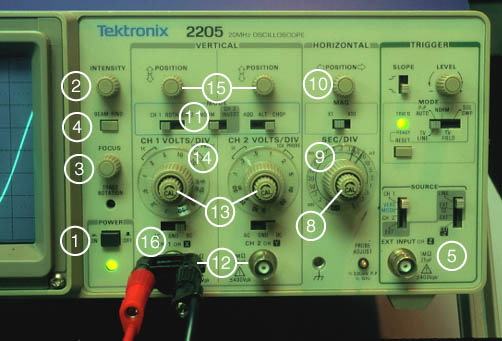
On/Off. Do not use the wall plug as an on/off switch. Good switches help to control electrical transients which can be harmful to sensitive circuit components.
开启/关闭。不要将插头用作开关。好的开关有助于控制可能对敏感电路元件有害的电气瞬变。
- Intensity. Adjust the brightness of the trace until you can just see all the details of the waveform. If the trace is too bright you will not get the best data, your eyes will get very tired, and you could damage the scope.
强度。调整迹线的亮度,直到能够清晰看到波形的所有细节。如果迹线太亮,将无法获得最佳数据,眼睛会很快疲劳,甚至可能损坏示波器。
- Focus. Rotate this button until the trace is sharp.
聚焦。旋转此按钮直到轨迹清晰。
- Beam finder. If you do not find a trace, push this button. The screen will display what quadrant the trace is in. You can then use the horizontal (#10) and vertical controls (#15) to move the trace to the middle of the screen.
束流探测器。如果未发现迹线,请按下此按钮。屏幕将显示迹线所在象限。然后你可以使用水平(#10)和垂直(#15)控制来将迹线移到屏幕中央。
- Triggering source and mode. You will use the scope to observe signals that repeat frequently. The scope must start the sweep at the same point on the waveform every time in order to produce a stable image on the screen. This function is called "triggering". For many common applications you should the source switch on "internal" and the mode switch to "auto". This lets the scope decide when to trigger.
触发源和模式。你将使用示波器观察重复出现的信号。为了在屏幕上产生稳定的图像,示波器必须每次都在波形的同一位置开始扫描。这个功能称为“触发”。对于许多常见应用,你应该将源开关设置为“内部”,并将模式开关设置为“自动”。这让示波器决定何时触发。
- Trigger Slope. Usually the signal voltage will equal the triggering voltage twice, once going up and once coming down. A trigger slope control enables you to select which voltage the scope will trigger on.
触发斜率。通常,信号电压会两次等于触发电压,一次是上升时,一次是下降时。触发斜率控制使你能够选择信号在上升或下降时触发。
- Trigger Level. This sets an internal voltage which is compared to the voltage of the input signal. When the input signal voltage equals the trigger voltage, the scope triggers. If you get an image that seems to be a superposition of many waves, turn the level knob back and forth slowly until you get a stable image.
触发电平。这设置了一个内部电压,该电压与输入信号的电压进行比较。当输入信号电压等于触发电压时,示波器会触发。如果你得到的图像似乎是由许多波的叠加而成,可以慢慢调节电平旋钮,直到图像稳定。
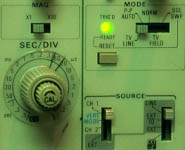
- Sweep calibration. This enables you to change the horizontal scale. Unless this knob is turned all the way clockwise, the scope is not calibrated and your data will be worthless. Turn this knob clockwise until it clicks and check it frequently as you take data.
扫描校准。这可以让你改变水平刻度。除非这个旋钮完全向顺时针方向旋转,否则示波器未校准,你的数据将毫无价值。将这个旋钮向顺时针方向旋转直到它发出咔嗒声,并在采集数据过程中经常检查它。
- Sweep. This determines the horizontal scale for the oscillograph. The scale is read in the upper white window. Its units are seconds/division. See Timebase illustration
扫描速度。这决定了示波器的水平刻度。刻度值在上方的白色窗口中读取,单位为秒/格。见时间基线示意图
- Horizontal position. This enables you to move the signal back and forth along the X-axis. This determines, in effect, the value the signal will have at the origin.
水平位置。这使你能够沿X轴方向移动信号。这实际上决定了信号在原点处的值。
- Channel select. Most oscilloscopes are dual trace. This means that they can display two signals at once, which is why there are two signal ports and two sensitivity controls.
通道选择。大多数示波器是双踪的。这意味着它们可以同时显示两个信号,这就是为什么有两个信号端口和两个灵敏度控制。
- Signal ports. There is one signal port for each channel. It is a BNC connector for this oscilloscope.
信号端口。每个通道有一个信号端口。这是一个BNC连接器。
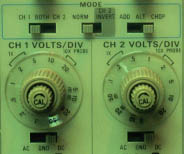
- Sensitivity calibration. This knob is used to change the vertical scale. If it is not turned all the way clockwise, the scope will be uncalibrated and your data will be worthless. Check this knob frequently as you take data.
灵敏度校准。这个旋钮用于调整垂直刻度。如果未完全顺时针旋转,示波器将未校准,你的数据将毫无价值。在采集数据时,要经常检查这个旋钮。
- Sensitivity. This determines the vertical scale. It is read in the left hand white window. The units are volts/division. See Voltage Sensitivity illustration
灵敏度。这决定了垂直刻度。它在左侧的白色窗口中读取。单位是伏特/格。见电压灵敏度示意图
- Vertical position. This knob controls the vertical position of the trace. You will find it very convenient when you are setting or reading voltages.
垂直位置。这个旋钮控制迹线的垂直位置。当你设置或读取电压时,会发现它非常方便。
- AC/DC select. When this is set to "AC" the DC part of the signal is filtered out by a capacitor placed in series between the signal input and the scope. When the selector is set to "ground", the beam will move to zero volts. When the selector is set to "DC", the entire signal will be displayed on the scope.
AC/DC选择。当设置为'AC'时,信号输入与示波器之间串联的电容器会滤除直流部分。当选择器设置为'接地'时,光束将移动到零伏特。当选择器设置为'DC'时,整个信号将在示波器上显示。
|
Index
Electronics concepts
索引电子学概念 |